If you have never asked who owns my domain name, this is the two-minute version. Also, your domain is the address every customer, every email and every ad points at. You can rebuild a pixel. You can rebuild a website. So you can even rebuild an ad account, given enough patience. Nobody rebuilds a domain, because there is only one of it. That makes this the shortest check on the list and the one worth doing first.
Why Who Owns My Domain Name Beats Every Other Check
Most assets on this list can start again. A new pixel gathers data. A new ad account spends money. So the damage is real, though it is measured in months rather than in permanence. Your domain works differently, because it is a unique name and nobody issues a second copy of it.
Also, the domain sits underneath things people rarely connect to it. Your email routing runs through it. Your site loads from it. Your ads point at it, and every link you have ever earned points there too. So one login controls far more than a web address. That is why this check goes first, ahead of the platform work.
For example, a lapsed domain takes your email down with the website. Staff lose their inboxes on the same morning customers lose your site. So the blast radius is wider than any ad account outage. Indeed, in our experience most owners underrate this until it happens once.
Running The Lookup And Reading The Result
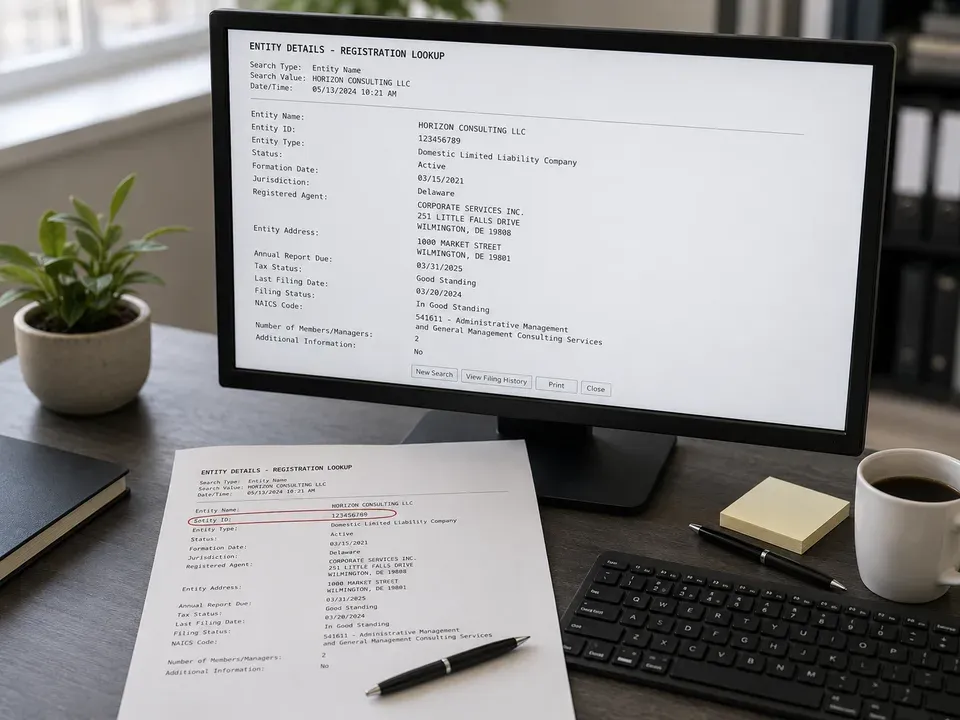
First, search for a public domain lookup tool and enter your domain. Also, the record comes back in seconds. Then read four lines: the registrar holding the domain, the creation date, the expiry date, and the domain status.
The expiry date deserves a note of its own. A domain that lapses can go to anyone, and recovery is neither quick nor certain. So check that the renewal sits on a card that still works and an inbox somebody reads. Also, note the name servers at the bottom, because they tell you where the site actually lives.
El Paso web design and development
What Privacy Protection Hides
Many domains now show a privacy service instead of a name. That is normal and often sensible, since it keeps your address out of spam lists. However, it also means the public record cannot answer your question. So privacy hides the contact details. It does not change who holds the account, and it does not stop you checking.
Of course, a vendor can also sit behind that privacy screen. Then the record tells you nothing useful at all. So treat the lookup as step one and the login as step two. In fact, the login is the only test that settles the question, and it takes about thirty seconds.
Registrar, Registrant And The Contacts
The record uses a few terms that sound alike and mean different things. Read the first column as the role, then the rest as what it controls.
| Trait | What it means | Where it comes from | What you notice |
|---|---|---|---|
| Registrar | The company you buy and renew the domain through. | Public lookup, first line | So you know which login screen to open. |
| Registrant | The party the domain belongs to on paper. | Public lookup, contact block | In fact, usually a privacy service rather than a name. |
| Admin contact | The address that approves changes and transfers. | Registrar account, contacts | Then a vendor email here means a vendor decides. |
| Name servers | The pointers that send traffic to your host. | Public lookup, last lines | Also, these reveal who runs your hosting. |
| Expiry date | The day the domain lapses without a renewal. | Public lookup, dates block | So a lapse costs far more than a renewal. |
The Email On The Record Is The Real Control Point
Here is the part most owners miss. Transfers, password resets and approval requests all travel to the admin email on the account. So whoever reads that inbox can approve a move, and whoever cannot read it must ask. In fact, the name on the record matters less than the inbox behind it. Put a work address you control there, and use one that survives a staff change.
How A Transfer Actually Works
A move follows the same three steps everywhere. First, unlock the domain at the current registrar. Second, request the authorization code, which is a short string proving you may move it. Third, start the transfer at the registrar you want to move to.
Then wait. The process runs on a fixed clock rather than on anyone's urgency, and both sides have to cooperate for it to finish. So start a move in a quiet week, never in the middle of a campaign launch. A site that already earns its keep, as covered in turning a site into a growth engine, is worth protecting with a calm handover.
Registrar Lock And Why A Move Stalls
Every domain carries a lock that blocks transfers by default. That lock is a good thing, since it stops anyone moving your domain without permission. However, it also stalls a move you actually want. If a transfer sits still for days, the lock is the first thing to check. Then check the admin email, because an unanswered approval request looks exactly like a technical fault.
There is a second stall worth knowing. A domain moved or renewed very recently can sit under a hold for a set period. So a transfer request will simply fail until that window closes. Then it works normally. Also, a vendor who cannot explain which of the three is blocking you is telling you something.
Hosting Is A Separate Question
People merge these two and then get a surprise. Your domain is the address. Your hosting is the building. So they can sit with different vendors, and both need your name on them.
- Check the host separately. Log in to the hosting account on its own, not through a link a vendor sends you each month.
- Ask who holds the site files. In fact, a live site is not the same as the theme, the templates and the content behind it.
- Confirm the backups. Then find out where they live and whether you can reach one without asking anybody.
- Check the email routing. Your mail records sit in the domain settings, so a careless move can take your inbox down with it.
Work through those four and you will know exactly what you hold. Design decisions rest on the same footing, which is why aligning branding and website design only pays off when the underlying accounts are yours. Search performance depends on it too, as does everything in SEO services in El Paso. Google explains how domain verification works across its own tools in Google's Search Console documentation, and broad footing on vendor agreements sits in the SBA small business guidance.
How to buy a website in El Paso
Frequently Asked Questions
So skip the public record and go straight to the registrar. Try to log in with a company address, then use the password reset if that fails. If the reset email lands somewhere you cannot reach, you have your answer without reading a single record.
Run a WHOIS lookup on your domain. The public record shows the registrar, the registration and expiration dates, the domain status, and the name servers. Privacy protection can mask the contact details.
Then the practical test is different: can you log into the registrar account yourself? Whoever controls that login controls the domain, regardless of what the public record shows.
Unlock the domain at the current registrar, obtain the authorization code, and start the transfer at the receiving registrar. It generally takes several days and both sides have to cooperate.
No. The domain is the address and the hosting is where the site lives. They are frequently held by different vendors, and both need to be in your name.
Settle Who Owns My Domain Name This Week
Answering who owns my domain name takes two minutes and one login attempt. So do it today, while the question is dull rather than urgent. If the login works, note it and move on. If it does not, you have found the single asset you cannot replace, and that is worth knowing now.