





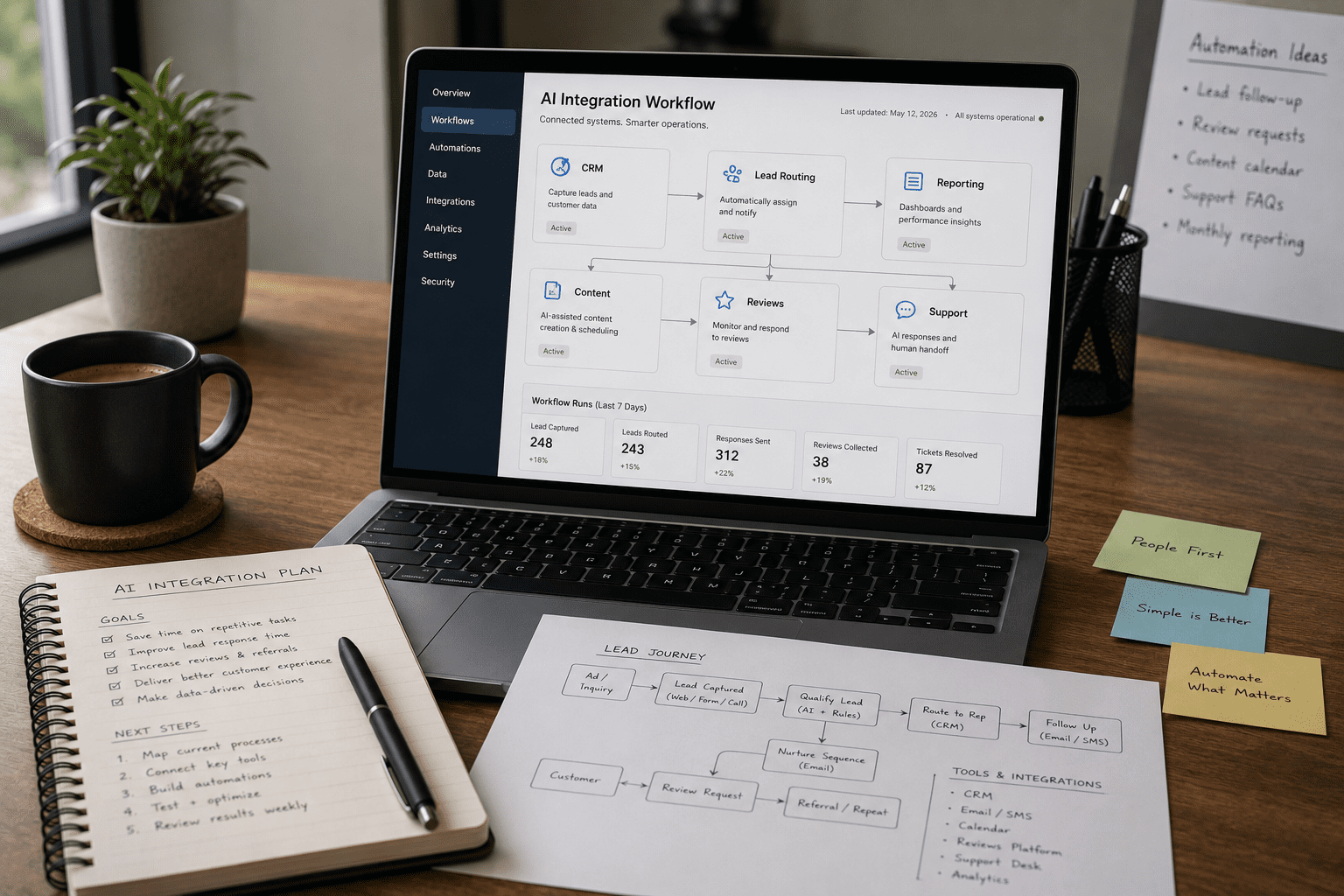
Custom AI Integration Small Business 2026
Custom AI integration small business 2026 should start with one practical question: what workflow needs to get faster, clearer, or easier to manage? AI is useful when it connects to real business systems. It is risky when it becomes another disconnected tool nobody owns.
What Is Custom AI Integration for Small Businesses in 2026?
Why Custom AI Integration Small Business 2026 Should Start With Workflows
The custom ai integration small business 2026 conversation should start with workflows because AI needs context. If the workflow is unclear, the AI will produce inconsistent output, duplicate effort, or make a messy system move faster.
Start by identifying repetitive work. Where does the team copy and paste information? Where do leads wait too long? Where does reporting take hours? Where does content production stall? Where do customer questions repeat? Those are better starting points than asking what AI tool to buy.
Next, define the trigger. A trigger might be a form submission, new CRM record, missed call, completed appointment, published blog, support request, invoice payment, or monthly reporting date. Then, define the AI-assisted action so a human can review, approve, or improve the output.
Custom AI Integration Small Business 2026 at a Glance
Use this table as a decision map. The best integration is the one tied to a real workflow problem and measurable business outcome.
| AI Integration Area | Workflow Problem | Custom Solution | Business Outcome | Risk to Avoid |
|---|---|---|---|---|
| Lead Handling | Leads arrive in scattered inboxes or forms | Summarize inquiries, tag service type, route to CRM | Faster response and fewer missed leads | Sending unreviewed AI messages |
| CRM Updates | Staff forget notes, stages, or follow-ups | Draft summaries and update fields from form data | Cleaner pipeline and better sales visibility | Bad data entering the CRM |
| Content Workflow | Blog, email, and social ideas stall | Turn service pages and FAQs into briefs and drafts | More consistent publishing | Generic content with no strategy |
| Reporting | Monthly reports take too long to prepare | Summarize analytics, leads, calls, and campaign data | Faster decisions and clearer performance | Reporting inaccurate numbers |
| Customer Support | The same questions repeat often | Suggest answers from approved knowledge sources | Faster support with consistent answers | AI inventing unsupported answers |
| Review Requests | Happy customers are not asked consistently | Trigger polite review requests after completion | Stronger trust and local visibility | Asking at the wrong time |
| Internal Tasks | Admin work slows the team | Automate checklists, reminders, and task summaries | Less manual work and better follow-through | Over-automating simple work |
Start With Lead Handling and CRM Integration
Lead handling is usually one of the strongest starting points for custom AI integration. If a business receives inquiries through forms, ads, email, calls, chat, or referrals, AI can help organize the first step without replacing human judgment.
A practical workflow might start when someone submits a website form. The system can capture the message, summarize the request, tag the service category, score urgency, notify the right person, and create a CRM task. Then, a team member can review the lead and respond.
This saves time, but it also creates better visibility. Instead of wondering which leads came from which source, the business can connect inquiries to campaigns, website pages, SEO efforts, or referral activity. However, AI should not make pricing promises, diagnose complex customer needs, or send sensitive responses without review.
Use AI for Content, SEO, and AI Discovery Workflows
A small business can also use custom AI integration to support content and SEO workflows. However, AI should not replace strategy, customer insight, or human editing.
Google’s Search Essentials emphasize helping search engines find, crawl, index, and understand content. That means AI-assisted content still needs clear structure, helpful answers, useful internal links, and language that matches how customers search.
A strong AI workflow might turn customer questions, service pages, call notes, and sales objections into blog briefs, FAQ drafts, email ideas, or social post outlines. Then, a strategist or editor can shape the final content. This matters even more as AI discovery becomes part of the buyer journey.
Build Reporting and Analytics AI Around Trusted Data
Reporting is another high-value AI integration area. Many small businesses spend hours gathering website traffic, form fills, calls, ad data, SEO performance, CRM activity, and sales notes into a monthly summary.
AI can help summarize that information. It can highlight changes, organize results by channel, draft performance notes, and flag questions for the team. Google Analytics can also support traffic and conversion measurement when tracking is configured correctly.
However, AI reporting is only as reliable as the data underneath it. If forms are not tracked, CRM stages are inconsistent, calls are not connected, or campaign names are messy, AI may summarize noise. Therefore, custom reporting AI should begin with data cleanup.
Keep AI Governance, Privacy, and Review in the Plan
A custom ai integration small business 2026 project should include governance from the beginning. Governance sounds formal, but for a small business it can be simple: decide what AI can access, what it can suggest, what it can send, who reviews it, and how mistakes are handled.
The NIST AI Risk Management Framework emphasizes managing AI risks around validity, reliability, safety, security, accountability, transparency, explainability, privacy, and fairness. Those ideas apply whenever AI touches customer data, business decisions, or public-facing communication.
Small businesses should start with practical guardrails. Do not connect AI to sensitive data unless there is a clear reason. Do not let AI send customer-facing messages without review until the workflow is tested. Keep approved source documents for support answers, log important outputs, and review failures.
How to Plan a Custom AI Integration for a Small Business
A custom ai integration small business 2026 plan should begin with one workflow, not ten. Trying to automate everything at once usually creates confusion, scope creep, and weak adoption.
First, choose a workflow with clear repetition and value. Lead routing, CRM summaries, reporting, review requests, and content briefs are strong starting points because they save time and connect to measurable outcomes.
Second, map the current process. What triggers the workflow? Who touches it? What tools are involved? What information is needed? What does success look like? Finally, decide whether AI should summarize, draft, classify, recommend, route, search, or report.
Explore VenPro web design →How VenPro Builds Custom AI Into Growth Systems
VenPro treats custom AI integration as part of a larger growth system. AI should connect to the website, SEO, content, CRM, analytics, automation, brand messaging, and performance marketing.
That matters because AI on its own is not a strategy. A chatbot with weak content cannot answer well. A reporting assistant with poor data cannot create reliable insights. A lead workflow with unclear messaging can still send the wrong response faster.
VenPro’s approach focuses on practical AI infrastructure: AI-powered SEO, marketing automation, predictive analytics, and custom AI integrations. For small businesses, that means using AI where it can reduce friction and support measurable growth.
Explore VenPro SEO services →Frequently Asked Questions
Q1 What does custom ai integration small business 2026 mean? +
Q2 What should a small business automate with AI first? +
Q3 How much does custom AI integration cost for a small business? +
Q4 Is custom AI integration safe for small businesses? +
Q5 What is the difference between an AI tool and custom AI integration? +
Build AI Around the Workflow, Not the Hype
The custom ai integration small business 2026 opportunity is not about adding AI everywhere. It is about choosing the right workflow, connecting the right tools, protecting the right data, and measuring the right outcome. Start small, keep a human review step, and measure whether the workflow saves time, improves follow-up, or supports growth.