





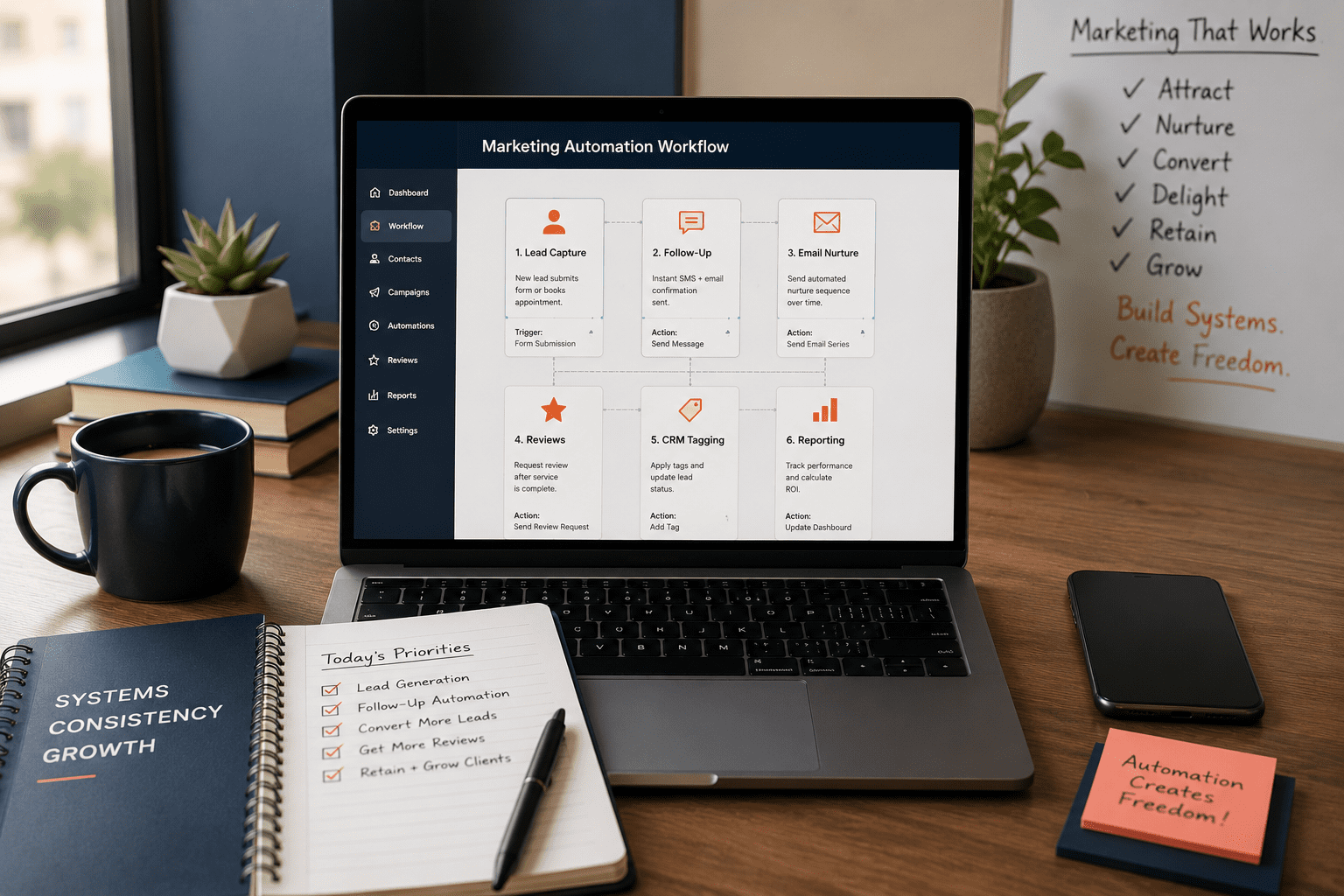
Marketing Automation Workflows Small Business
Marketing automation workflows small business owners can actually use should start with one idea: workflow before software. The tool matters, but the process matters more. If a business automates a broken follow-up process, it only makes the broken process happen faster.
What Marketing Automation Workflows Should a Small Business Start With?
Why Marketing Automation Workflows Small Business Teams Need Start With Triggers
Marketing automation workflows small business teams build should always start with triggers. A trigger is the moment that starts the workflow. It might be a form submission, missed call, booked appointment, quote request, abandoned cart, new review, website download, or CRM status change.
Without a trigger, automation becomes vague. With a trigger, the business can define what should happen next. For example, if someone fills out a contact form, the workflow can send an instant confirmation, notify the team, create a CRM task, and start a follow-up sequence.
This is where small business automation becomes useful. It takes repeatable moments and turns them into reliable actions. As a result, the team spends less time remembering what to do and more time handling the conversations that need human attention.
Marketing Automation Workflows Small Business Teams Can Use at a Glance
Use this table as a practical workflow map. Start with one or two high-value workflows, then build from there.
| Workflow | Trigger | Automated Action | Business Goal | Risk to Avoid |
|---|---|---|---|---|
| Lead capture follow-up | Contact form or quote request | Send confirmation, notify team, create CRM task | Faster response and fewer missed leads | Generic replies with no next step |
| Email nurture | New lead or download | Send helpful sequence over several days | Build trust before the sales call | Too many emails too fast |
| Appointment reminders | Booking confirmed | Send reminder by email or SMS | Reduce no-shows | No opt-out or wrong timing |
| Review request | Job completed or invoice paid | Ask for review with direct link | Grow local trust signals | Asking too soon or too often |
| Abandoned inquiry | Lead stops responding | Send follow-up reminder or check-in | Recover lost opportunities | Pushy messaging |
| CRM tagging | Source, service, or location captured | Tag lead and route to right pipeline | Cleaner sales tracking | Overcomplicated tag structure |
| Monthly reporting | End of month or campaign period | Summarize leads, calls, forms, and traffic | Better decisions | Reporting vanity metrics only |
Start With Lead Capture and Instant Follow-Up
The first workflow most small businesses should build is lead capture follow-up. If someone fills out a form, requests a quote, books a consultation, or clicks a high-intent CTA, the business needs to respond quickly.
A basic workflow can send an instant confirmation to the prospect, notify the right team member, create a CRM task, and tag the lead by service or source. That may sound simple, but it prevents one of the most common growth leaks: slow follow-up.
For example, a home service company may receive inquiries from Google Search, Google Maps, website forms, paid ads, and referrals. Without automation, those leads may sit in different inboxes. With automation, the business can route each lead to the right person and track which channels create real conversations.
Build Email Nurture Without Sounding Robotic
Email nurture is one of the most useful marketing automation workflows for small business teams, but it has to feel human. The goal is not to flood a lead with messages. The goal is to answer common questions, reduce hesitation, and help the person take the next step.
A simple nurture workflow might include a welcome email, a short explanation of the service, a proof point, a helpful FAQ, and a clear invitation to book a call. Additionally, the sequence can change based on the service, location, lead source, or stage in the sales process.
The best nurture emails sound specific. They should mention the customer’s likely problem, the next step, and the benefit of responding. Also, keep humans in the loop. If a lead replies, asks a detailed question, or shows buying intent, the workflow should alert the team.
Use Review, Referral, and Re-Engagement Workflows
Some automation workflows support growth after the first sale. Review requests, referral prompts, and re-engagement sequences can help small businesses build trust and stay top of mind.
A review request workflow can trigger after a project is completed, an appointment is fulfilled, or an invoice is paid. The message should be short, polite, and easy to act on. If the business serves local customers, this can support Google Business Profile visibility and customer trust.
Google Business Profile performance reporting can help businesses understand how people interact with their profile through calls, messages, bookings, directions, and website clicks. That makes review and local visibility workflows more valuable because they connect reputation signals to customer actions.
Connect Automation to SEO, Website, and CRM Data
Marketing automation workflows small business owners build should not live separately from SEO, web design, or CRM data. Automation works better when it knows where the lead came from, what page they viewed, what service they asked about, and what action they took next.
Google’s Search Essentials emphasize clear, accessible content that search engines can find, crawl, index, and understand. That matters because SEO brings qualified visitors to the site, but automation helps the business respond once those visitors take action.
For example, an SEO service page can capture a form inquiry. The workflow can tag the lead as SEO, send a relevant confirmation email, notify the right person, and include the source in monthly reporting. Over time, the business can see which pages and campaigns create the best leads.
How to Build Marketing Automation Workflows for Small Business
A marketing automation workflows small business plan should begin with the customer journey. Map the path from first touch to booked call, sale, review, and repeat business. Then, identify where manual work slows the process down.
First, choose one workflow with a clear business case. Lead response is usually the best starting point because it protects revenue opportunities. Review requests, appointment reminders, and email nurture are also strong early wins.
Second, define the trigger and action. For example: “When a quote form is submitted, send confirmation, notify sales, create a CRM task, and tag the lead by service.” Keep the first version simple. Finally, track response time, booked calls, form follow-up rate, review volume, qualified leads, and conversion rate.
Read VenPro automation guide →How VenPro Builds Automation Into a Growth System
VenPro does not treat automation as a disconnected tool. It connects automation to brand messaging, web design, SEO, AI, CRM activity, analytics, and performance marketing.
That matters because workflows depend on the systems around them. A follow-up automation needs clear messaging. A CRM workflow needs clean data. A review request needs the right timing. A reporting workflow needs accurate tracking. A lead-routing workflow needs a website that captures the right information.
VenPro’s marketing automation content focuses on streamlining repetitive tasks, nurturing leads, delivering personalized experiences, saving time, improving efficiency, and scaling growth. In short, automation should make the growth system easier to run.
See VenPro web design →Frequently Asked Questions
Q1 What are the best marketing automation workflows small business teams should start with? +
Q2 What is a marketing automation workflow? +
Q3 How can small businesses use automation without sounding robotic? +
Q4 What should small businesses automate first? +
Q5 How do you measure marketing automation ROI? +
Build Workflows Before Buying More Software
Marketing automation workflows small business owners trust should make growth easier to manage. They should reduce missed leads, protect follow-up, improve customer communication, support local trust, and give the team better visibility into what is working. The smartest automation starts small: pick one workflow, define the trigger, write the message, assign the owner, and track the result.